Many WordPress users trust backup plugins. They install one, schedule daily backups, and send files to Dropbox or Google Drive. This creates a strong sense of safety. It feels like you can restore your site with one click at any time.
But this is not true. A backup plugin protects your WordPress files, not your server. When the server fails, the plugin cannot help you. This is why many users face a complete WordPress backup plugin failure without warning.
1. The False Sense of Security
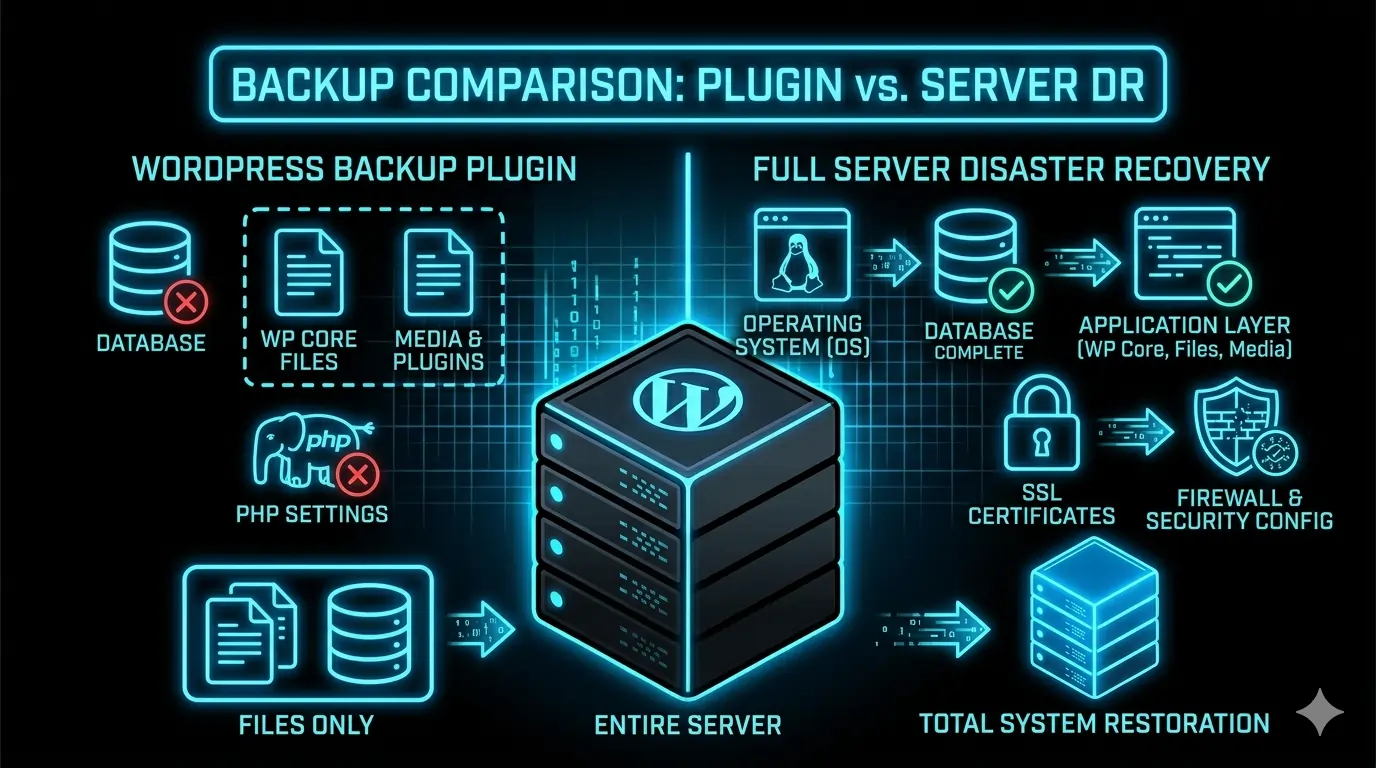
A backup plugin works only when WordPress works. It can fix small issues like a broken theme or a failed update. It can restore posts, media, and plugins. But it cannot fix server problems.
Most plugins simply:
- Create a ZIP file of your WordPress files
- Export your database
- Upload the backup to a remote service
This is useful, but limited. If the server is offline or corrupted, the plugin cannot run. Your “restore” button disappears.
2. When the Server Goes Down
A server crash is very different from a WordPress error. In a server failure, the problem is not your site. The problem is the environment that runs your site.
Common server failures include:
- File system corruption
- Database corruption
- Kernel panic
- Hardware failure
Many users think the host will fix everything. But hosting providers usually restore only a clean operating system. They do not rebuild your configuration, SSL certificates, firewall rules, or PHP settings.
For database issues, see our guide on fixing MySQL InnoDB corruption.
3. Why Plugin Backups Are Not Enough
A plugin can restore your WordPress files. But a server crash requires rebuilding the entire stack. This includes:
- Operating system
- Nginx or Apache configuration
- Database engine and settings
- PHP version and extensions
- SSH keys and user accounts
- SSL certificates
- Firewall rules and cron jobs
Your plugin does not know any of this. It was never designed to handle server-level recovery.
4. The Risk of Storing Backups on the Same Server
Many site owners store backups on the same server that hosts their website. This is extremely risky. If the disk fails or the file system is corrupted, all backups are lost.
A real backup must be stored in a different physical location. Cloud storage is the safest option.
5. Why Moving to a New Host Does Not Fix the Problem
After a crash, many users switch hosting providers. But the problem often follows them. A server disaster is rarely caused by the host alone. It is usually caused by a broken configuration that gets migrated to the new server.
For performance issues, see our guide on WordPress performance optimization.
6. Why You Should Not Attempt Server Recovery Alone
A server crash is complex. It is not a plugin conflict. Rebuilding a server requires deep technical knowledge. A single wrong command can destroy your data permanently.
Trying to fix a server while your business is offline is risky. Professional help is often the safest option.
7. When to Call a Professional
You should seek expert support when:
- Your server is offline or stuck in a crash loop
- MySQL will not start
- Your site was hacked
- You must migrate after hardware failure
- You need a secure and optimized server environment
For official guidance, see the WordPress database restoration guide.
Conclusion
A backup plugin is useful, but it is not a full backup strategy. A real plan protects your entire environment: the application, the database, and the server.
Do not rely on a single ZIP file. A server crash can expose the limits of plugin-based backups instantly. Use a professional backup strategy and keep your data safe.
👉 Request Professional Server Recovery Support