
When your site slows down or becomes unstable, the real cause is often hidden inside your server hosting WordPress environment. Even when your hosting dashboard shows everything as “OK”, your server may be struggling with CPU spikes, I/O latency or PHP-FPM limits that silently degrade performance.
In this guide, you’ll discover:
- the hidden server performance issues that hosting companies never reveal
- the real hosting bottlenecks that slow down WordPress
- why switching hosting rarely fixes anything
- how to detect server-level problems
- and why you should never try to fix these issues alone

1. CPU Spikes in Server Hosting WordPress Environments
Most server hosting WordPress setups fail long before the user notices, because the real bottlenecks are not visible in standard dashboards. CPU is the beating heart of your server. When it spikes, your site:
- slows down
- times out
- throws 500 errors
- becomes randomly unresponsive
Hosting dashboards often show reassuring messages like:
“CPU usage: Normal”
But behind the scenes:
- PHP-FPM is saturated
- processes are stuck in queue
- requests are being terminated
- the server is throttling your resources
Why does this happen?
Because CPU load is influenced by:
- PHP processes
- MariaDB queries
- cron jobs
- heavy plugins
- traffic spikes
- aggressive bots
Why can’t users diagnose this?
You need SSH access, htop, PHP-FPM pool analysis and server logs. Hosting dashboards don’t show this level of detail.

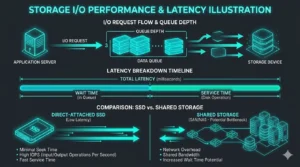
2. Storage Latency: A Hidden Server Performance Issue
This is one of the most common issues in server hosting WordPress environments using shared storage. If your site feels slow when saving, updating plugins or loading the admin panel, the problem may be storage latency.
Shared hosting often suffers from:
- I/O wait
- queue depth saturation
- latency spikes
- filesystem congestion
Users often think:
“Maybe I need a caching plugin.”
No. Your disk is simply overloaded.
3. Hosting Bottlenecks and Server Limitations You Never See
Every hosting provider has invisible limits. These server limitations are the real reason your site slows down or crashes.
PHP-FPM max children
When this limit is reached, requests queue and 502/504 errors appear.
MariaDB max connections
When exceeded, WordPress shows “Error establishing database connection”.
CPU burst limits
Many hosts give you fast CPU for 30 seconds, then throttle you.
Real RAM availability
Plans advertise “8GB RAM”, but only a fraction is truly available.
Process limits
When reached, your site appears offline even if the server “looks fine”.
4. When WordPress Problems Are Actually Server Diagnostics Issues
Most users spend months disabling plugins, switching themes or installing caching plugins. But the problem isn’t WordPress — it’s the server.
Clear signs the issue is server-level:
- 502/504 errors
- slow backend
- cron jobs not running
- plugins failing to update
- random timeouts
- slow queries even with caching
These require server diagnostics, not plugin tweaking.
Learn more about log analysis in this internal guide:
How to Read WordPress Error Logs: Complete Technical Guide
5. Why Switching Hosting Doesn’t Fix Server Performance Issues
Users often switch hosting repeatedly, but the problem follows them. Why?
Because the issue is configuration, not the provider:
- PHP-FPM not optimized
- MariaDB using defaults
- bots saturating resources
- plugins generating slow queries
Internal link suggestion:
Why Your WordPress Site Is Slow Even With Caching Plugins
6. The Truth About Server Hosting WordPress Complexity
A server is a complex ecosystem involving CPU, RAM, I/O, PHP-FPM, MariaDB, Nginx/Apache, caching layers, cron jobs, real traffic and bot traffic.
Most users don’t realize that server hosting WordPress setups require proper tuning of PHP-FPM, MariaDB and Nginx to avoid performance degradation.
You’re not supposed to know how to tune these systems. That’s not your job.
7. When to Get Professional Server Hosting Troubleshooting
If your site:
- slows down
- crashes
- shows 500/502/504 errors
- fails to update plugins
- shows database errors
It’s time for server hosting troubleshooting, not guesswork.
External reference:
Official WordPress Server Documentation
Conclusion: Your Server Is Talking. You Need Someone Who Can Listen.
If your server hosting WordPress setup is not optimized, your site will always feel slow. The real solution is a professional diagnosis — not more plugins, not more hosting migrations.